Note
Go to the end to download the full example code.
07. DCNet with plug-and-play DRUNet denoising
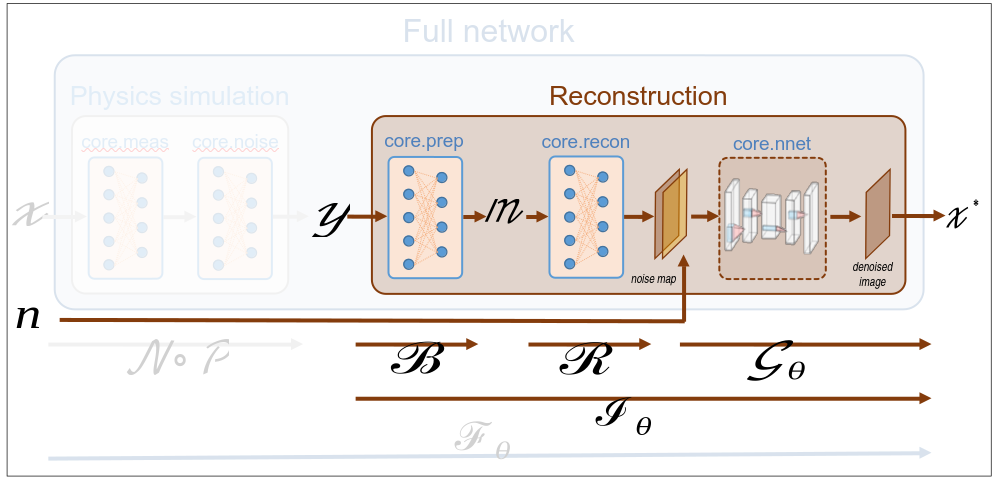
This tutorial shows how to perform image reconstruction using a DCNet (data completion network) that includes a DRUNet denoiser. DRUNet is a pretrained plug-and-play denoising network that has been pretrained for a wide range of noise levels. DRUNet admits the noise level as an input. Contratry to the DCNet described in Tutorial 6, it requires no training.
The beginning of this tutorial is identical to the previous one.
Note
As in the previous tutorials, we consider a split Hadamard operator and measurements corrupted by Poisson noise (see Tutorial 5).
Load a batch of images
Images \(x\) for training neural networks expect values in [-1,1]. The images are normalized using the transform_gray_norm() function.
# sphinx_gallery_thumbnail_path = 'fig/drunet.png'
import os

import torch
import torchvision
import matplotlib.pyplot as plt

import spyrit.core.torch as spytorch
from spyrit.misc.disp import imagesc
from spyrit.misc.statistics import transform_gray_norm

spyritPath = os.getcwd()
imgs_path = os.path.join(spyritPath, "images/")
Images \(x\) for training neural networks expect values in [-1,1]. The images are normalized and resized using the transform_gray_norm() function.
h = 64  # image is resized to h x h
transform = transform_gray_norm(img_size=h)
Create a data loader from some dataset (images must be in the folder images/test/)
dataset = torchvision.datasets.ImageFolder(root=imgs_path, transform=transform)
dataloader = torch.utils.data.DataLoader(dataset, batch_size=7)

x, _ = next(iter(dataloader))
print(f"Shape of input images: {x.shape}")
Shape of input images: torch.Size([7, 1, 64, 64])
Select the i-th image in the batch
i = 1  # Image index (modify to change the image)
x = x[i : i + 1, :, :, :]
x = x.detach().clone()
print(f"Shape of selected image: {x.shape}")
b, c, h, w = x.shape
Shape of selected image: torch.Size([1, 1, 64, 64])
Plot the selected image
imagesc(x[0, 0, :, :], r"$x$ in [-1, 1]")
![$x$ in [-1, 1]](../_images/sphx_glr_tuto_07_drunet_split_measurements_001.png)
/home/docs/checkouts/readthedocs.org/user_builds/spyrit/envs/2.4.0/lib/python3.11/site-packages/matplotlib/cbook.py:684: DeprecationWarning: __array__ implementation doesn't accept a copy keyword, so passing copy=False failed. __array__ must implement 'dtype' and 'copy' keyword arguments. To learn more, see the migration guide https://numpy.org/devdocs/numpy_2_0_migration_guide.html#adapting-to-changes-in-the-copy-keyword
  x = np.array(x, subok=True, copy=copy)
Operators for split measurements
We consider noisy measurements obtained from a split Hadamard operator, and a subsampling strategy that retaines the coefficients with the largest variance (for more details, refer to Tutorial 5).
First, we download the covariance matrix from our warehouse.
from spyrit.misc.load_data import download_girder

# download parameters
url = "https://tomoradio-warehouse.creatis.insa-lyon.fr/api/v1"
dataId = "672207cbf03a54733161e95d"
data_folder = "./stat/"
cov_name = "Cov_64x64.pt"
# download the covariance matrix
file_abs_path = download_girder(url, dataId, data_folder, cov_name)

try:
    Cov = torch.load(file_abs_path, weights_only=True)
    print(f"Cov matrix {cov_name} loaded")
except:
    Cov = torch.eye(h * h)
    print(f"Cov matrix {cov_name} not found! Set to the identity")
File already exists at ./stat/Cov_64x64.pt
Cov matrix Cov_64x64.pt loaded
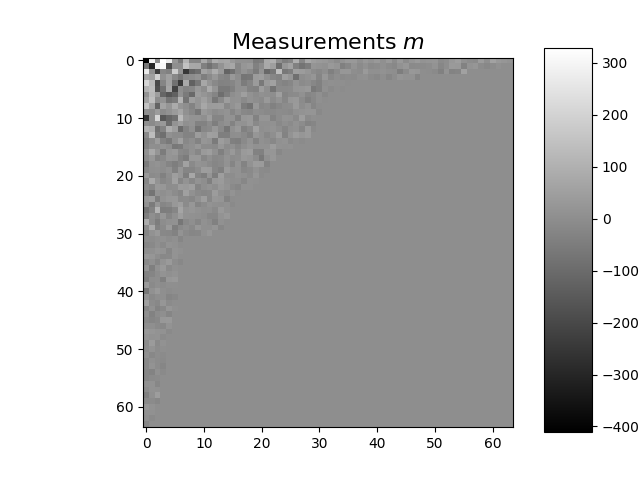
We define the measurement, noise and preprocessing operators and then simulate a measurement vector corrupted by Poisson noise. As in the previous tutorials, we simulate an accelerated acquisition by subsampling the measurement matrix by retaining only the first rows of a Hadamard matrix that is permuted looking at the diagonal of the covariance matrix.
from spyrit.core.meas import HadamSplit
from spyrit.core.noise import Poisson
from spyrit.core.prep import SplitPoisson

# Measurement parameters
M = h**2 // 4  # Number of measurements (here, 1/4 of the pixels)
alpha = 100.0  # number of photons

# Measurement and noise operators
Ord = spytorch.Cov2Var(Cov)
meas_op = HadamSplit(M, h, Ord)
noise_op = Poisson(meas_op, alpha)
prep_op = SplitPoisson(alpha, meas_op)

print(f"Shape of image: {x.shape}")

# Measurements
y = noise_op(x)  # a noisy measurement vector
m = prep_op(y)  # preprocessed measurement vector

m_plot = spytorch.meas2img(m, Ord)
imagesc(m_plot[0, 0, :, :], r"Measurements $m$")
Shape of image: torch.Size([1, 1, 64, 64])
/home/docs/checkouts/readthedocs.org/user_builds/spyrit/envs/2.4.0/lib/python3.11/site-packages/matplotlib/cbook.py:684: DeprecationWarning: __array__ implementation doesn't accept a copy keyword, so passing copy=False failed. __array__ must implement 'dtype' and 'copy' keyword arguments. To learn more, see the migration guide https://numpy.org/devdocs/numpy_2_0_migration_guide.html#adapting-to-changes-in-the-copy-keyword
  x = np.array(x, subok=True, copy=copy)
DRUNet denoising
Starting here, this tutorial differs from what has been seen in the previous one.
DRUNet is defined by the spyrit.external.drunet.DRUNet class. This
class inherits from the original spyrit.external.drunet.UNetRes class
introduced in [ZhLZ21], with some modifications to handle different noise levels.
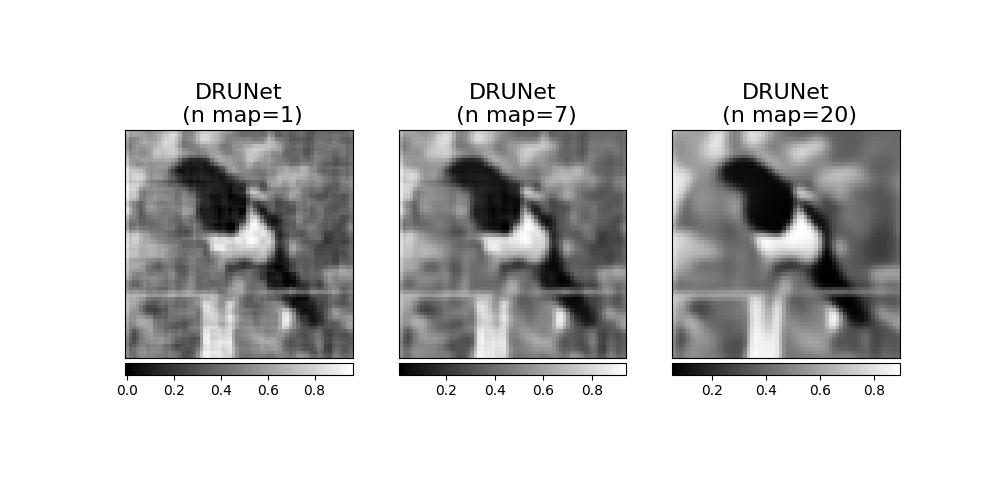
We instantiate the DRUNet by providing the noise level, which is expected to be in [0, 255], and the number of channels. The larger the noise level, the higher the denoising.
from spyrit.external.drunet import DRUNet

noise_level = 7
denoi_drunet = DRUNet(noise_level=noise_level, n_channels=1)

# Use GPU, if available
device = torch.device("cuda:0" if torch.cuda.is_available() else "cpu")
print("Using device:", device)
denoi_drunet = denoi_drunet.to(device)
Using device: cpu
We download the pretrained weights of the DRUNet and load them.
# Load pretrained model
url = "https://tomoradio-warehouse.creatis.insa-lyon.fr/api/v1"
dataID = "667ebf9ebaa5a9000705895e"  # unique ID of the file
local_folder = "./model/"
data_name = "tuto7_drunet_gray.pth"
model_drunet_abs_path = download_girder(url, dataID, local_folder, data_name)

# Load pretrained weights
denoi_drunet.load_state_dict(
    torch.load(model_drunet_abs_path, weights_only=True), strict=False
)
Downloading tuto7_drunet_gray.pth...
Downloading tuto7_drunet_gray.pth... done.

_IncompatibleKeys(missing_keys=['noise_level'], unexpected_keys=[])
Pluggind the DRUnet in a DCNet
We define the DCNet network by providing the forward operator, preprocessing operator, covariance prior and denoising prior. The DCNet class spyrit.core.recon.DCNet is discussed in Tutorial 06.
from spyrit.core.recon import DCNet

dcnet_drunet = DCNet(noise_op, prep_op, Cov, denoi=denoi_drunet)
dcnet_drunet = dcnet_drunet.to(device)  # Use GPU, if available
Then, we reconstruct the image from the noisy measurements.
with torch.no_grad():
    z_dcnet_drunet = dcnet_drunet.reconstruct(y.to(device))
Tunning of the denoising
We reconstruct the images for another two different noise levels of DRUnet
noise_level_2 = 1
noise_level_3 = 20

with torch.no_grad():

    denoi_drunet.set_noise_level(noise_level_2)
    z_dcnet_drunet_2 = dcnet_drunet.reconstruct(y.to(device))

    denoi_drunet.set_noise_level(noise_level_3)
    z_dcnet_drunet_3 = dcnet_drunet.reconstruct(y.to(device))
Plot all reconstructions
from spyrit.misc.disp import add_colorbar, noaxis

f, axs = plt.subplots(1, 3, figsize=(10, 5))

im1 = axs[0].imshow(z_dcnet_drunet_2.cpu()[0, 0, :, :], cmap="gray")
axs[0].set_title(f"DRUNet\n (n map={noise_level_2})", fontsize=16)
noaxis(axs[0])
add_colorbar(im1, "bottom")

im2 = axs[1].imshow(z_dcnet_drunet.cpu()[0, 0, :, :], cmap="gray")
axs[1].set_title(f"DRUNet\n (n map={noise_level})", fontsize=16)
noaxis(axs[1])
add_colorbar(im2, "bottom")

im3 = axs[2].imshow(z_dcnet_drunet_3.cpu()[0, 0, :, :], cmap="gray")
axs[2].set_title(f"DRUNet\n (n map={noise_level_3})", fontsize=16)
noaxis(axs[2])
add_colorbar(im3, "bottom")

plt.show()
/home/docs/checkouts/readthedocs.org/user_builds/spyrit/envs/2.4.0/lib/python3.11/site-packages/matplotlib/cbook.py:684: DeprecationWarning: __array__ implementation doesn't accept a copy keyword, so passing copy=False failed. __array__ must implement 'dtype' and 'copy' keyword arguments. To learn more, see the migration guide https://numpy.org/devdocs/numpy_2_0_migration_guide.html#adapting-to-changes-in-the-copy-keyword
  x = np.array(x, subok=True, copy=copy)
/home/docs/checkouts/readthedocs.org/user_builds/spyrit/envs/2.4.0/lib/python3.11/site-packages/matplotlib/cbook.py:684: DeprecationWarning: __array__ implementation doesn't accept a copy keyword, so passing copy=False failed. __array__ must implement 'dtype' and 'copy' keyword arguments. To learn more, see the migration guide https://numpy.org/devdocs/numpy_2_0_migration_guide.html#adapting-to-changes-in-the-copy-keyword
  x = np.array(x, subok=True, copy=copy)
/home/docs/checkouts/readthedocs.org/user_builds/spyrit/envs/2.4.0/lib/python3.11/site-packages/matplotlib/cbook.py:684: DeprecationWarning: __array__ implementation doesn't accept a copy keyword, so passing copy=False failed. __array__ must implement 'dtype' and 'copy' keyword arguments. To learn more, see the migration guide https://numpy.org/devdocs/numpy_2_0_migration_guide.html#adapting-to-changes-in-the-copy-keyword
  x = np.array(x, subok=True, copy=copy)
Alternative implementation showing the advantage of the DRUNet class
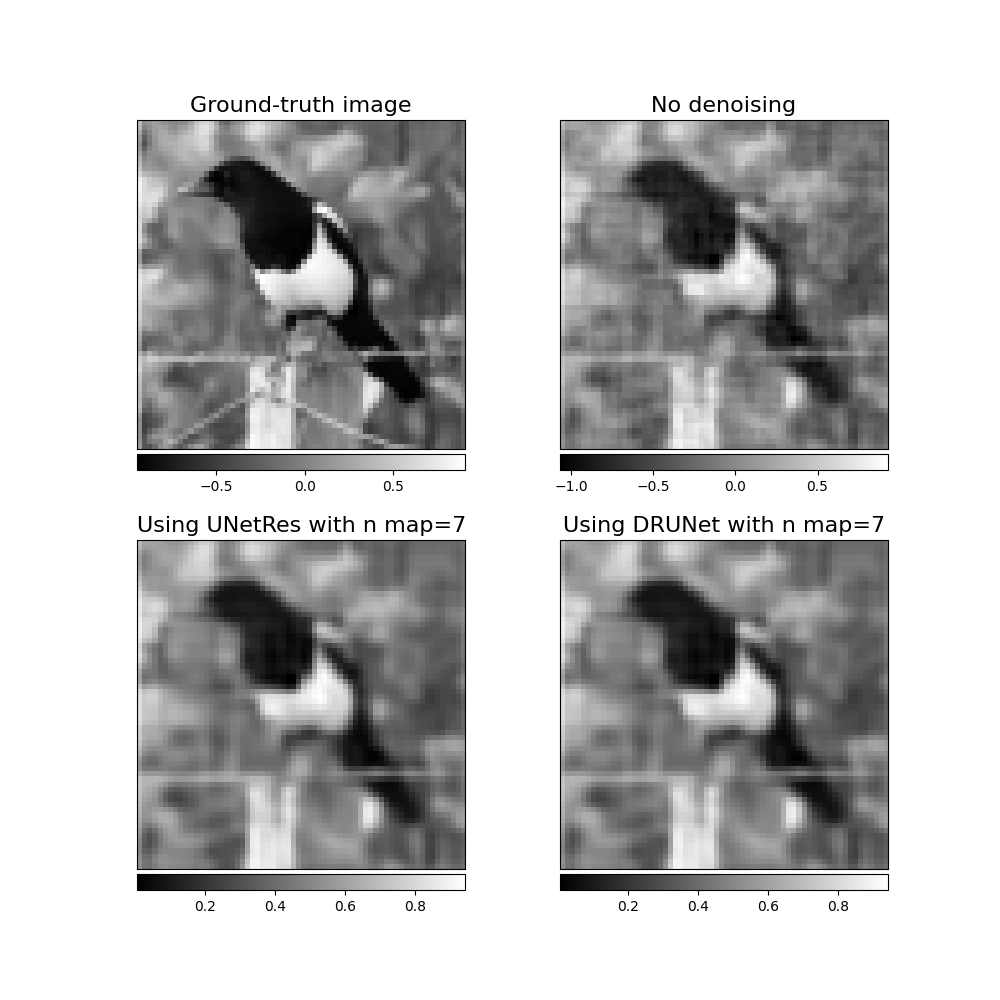
First, we consider DCNet without denoising in the image domain (default behaviour)
Then, we instantiate DRUNet using the original class spyrit.external.drunet.UNetRes.
from spyrit.external.drunet import UNetRes as drunet

# Define denoising network
n_channels = 1  # 1 for grayscale image
drunet_den = drunet(in_nc=n_channels + 1, out_nc=n_channels)

# Load pretrained model
try:
    drunet_den.load_state_dict(
        torch.load(model_drunet_abs_path, weights_only=True), strict=True
    )
    print(f"Model {model_drunet_abs_path} loaded.")
except:
    print(f"Model {model_drunet_abs_path} not found!")
    load_drunet = False
drunet_den = drunet_den.to(device)
Model /home/docs/checkouts/readthedocs.org/user_builds/spyrit/checkouts/2.4.0/tutorial/model/tuto7_drunet_gray.pth loaded.
To denoise the output of DCNet, we create noise-level map that we concatenate to the output of DCNet that we normalize in [0,1]
x_sample = 0.5 * (z_dcnet + 1).cpu()

#
x_sample = torch.cat(
    (
        x_sample,
        torch.FloatTensor([noise_level / 255.0]).repeat(
            1, 1, x_sample.shape[2], x_sample.shape[3]
        ),
    ),
    dim=1,
)
x_sample = x_sample.to(device)

with torch.no_grad():
    z_dcnet_den = drunet_den(x_sample)
We plot all results
f, axs = plt.subplots(2, 2, figsize=(10, 10))

im1 = axs[0, 0].imshow(x.cpu()[0, 0, :, :], cmap="gray")
axs[0, 0].set_title("Ground-truth image", fontsize=16)
noaxis(axs[0, 0])
add_colorbar(im1, "bottom")

im2 = axs[0, 1].imshow(z_dcnet.cpu()[0, 0, :, :], cmap="gray")
axs[0, 1].set_title("No denoising", fontsize=16)
noaxis(axs[0, 1])
add_colorbar(im2, "bottom")

im3 = axs[1, 0].imshow(z_dcnet_drunet.cpu()[0, 0, :, :], cmap="gray")
axs[1, 1].set_title(f"Using DRUNet with n map={noise_level}", fontsize=16)
noaxis(axs[1, 0])
add_colorbar(im3, "bottom")

im4 = axs[1, 1].imshow(z_dcnet_den.cpu()[0, 0, :, :], cmap="gray")
axs[1, 0].set_title(f"Using UNetRes with n map={noise_level}", fontsize=16)
noaxis(axs[1, 1])
add_colorbar(im4, "bottom")

plt.show()
/home/docs/checkouts/readthedocs.org/user_builds/spyrit/envs/2.4.0/lib/python3.11/site-packages/matplotlib/cbook.py:684: DeprecationWarning: __array__ implementation doesn't accept a copy keyword, so passing copy=False failed. __array__ must implement 'dtype' and 'copy' keyword arguments. To learn more, see the migration guide https://numpy.org/devdocs/numpy_2_0_migration_guide.html#adapting-to-changes-in-the-copy-keyword
  x = np.array(x, subok=True, copy=copy)
/home/docs/checkouts/readthedocs.org/user_builds/spyrit/envs/2.4.0/lib/python3.11/site-packages/matplotlib/cbook.py:684: DeprecationWarning: __array__ implementation doesn't accept a copy keyword, so passing copy=False failed. __array__ must implement 'dtype' and 'copy' keyword arguments. To learn more, see the migration guide https://numpy.org/devdocs/numpy_2_0_migration_guide.html#adapting-to-changes-in-the-copy-keyword
  x = np.array(x, subok=True, copy=copy)
/home/docs/checkouts/readthedocs.org/user_builds/spyrit/envs/2.4.0/lib/python3.11/site-packages/matplotlib/cbook.py:684: DeprecationWarning: __array__ implementation doesn't accept a copy keyword, so passing copy=False failed. __array__ must implement 'dtype' and 'copy' keyword arguments. To learn more, see the migration guide https://numpy.org/devdocs/numpy_2_0_migration_guide.html#adapting-to-changes-in-the-copy-keyword
  x = np.array(x, subok=True, copy=copy)
/home/docs/checkouts/readthedocs.org/user_builds/spyrit/envs/2.4.0/lib/python3.11/site-packages/matplotlib/cbook.py:684: DeprecationWarning: __array__ implementation doesn't accept a copy keyword, so passing copy=False failed. __array__ must implement 'dtype' and 'copy' keyword arguments. To learn more, see the migration guide https://numpy.org/devdocs/numpy_2_0_migration_guide.html#adapting-to-changes-in-the-copy-keyword
  x = np.array(x, subok=True, copy=copy)
Note
In this tutorial, we have used DRUNet with a DCNet but it can be used any other network, such as pinvNet. In addition, we have considered pretrained weights, leading to a plug-and-play strategy that does not require training. However, the DCNet-DRUNet network can be trained end-to-end to improve the reconstruction performance in a specific setting (where training is done for all noise levels at once). For more details, refer to the paper [ZhLZ21].
Note
We refer to spyrit-examples tutorials for a comparison of different solutions (pinvNet, DCNet and DRUNet) that can be run in colab.
References for DRUNet
Zhang, K.; Li, Y.; Zuo, W.; Zhang, L.; Van Gool, L.; Timofte, R..: Plug-and-Play Image Restoration with Deep Denoiser Prior. In: IEEE Transactions on Pattern Analysis and Machine Intelligence, 44(10), 6360-6376, 2021.
Zhang, K.; Zuo, W.; Gu, S.; Zhang, L..: Learning Deep CNN Denoiser Prior for Image Restoration. In: IEEE Conference on Computer Vision and Pattern Recognition, 3929-3938, 2017.
Total running time of the script: (2 minutes 15.313 seconds)